Apps · Digital products2023
MyLibrary
A reading tracker for iOS and Android. Find a book, put it on a shelf, and watch your progress fill in, page by page.
- Role
- UI/UX designer & Flutter developer
- Platform
- iOS & Android
- Built with
- Figma, Dart, Firebase, Flutter
- Timeline
- March to August 2023
01
The idea
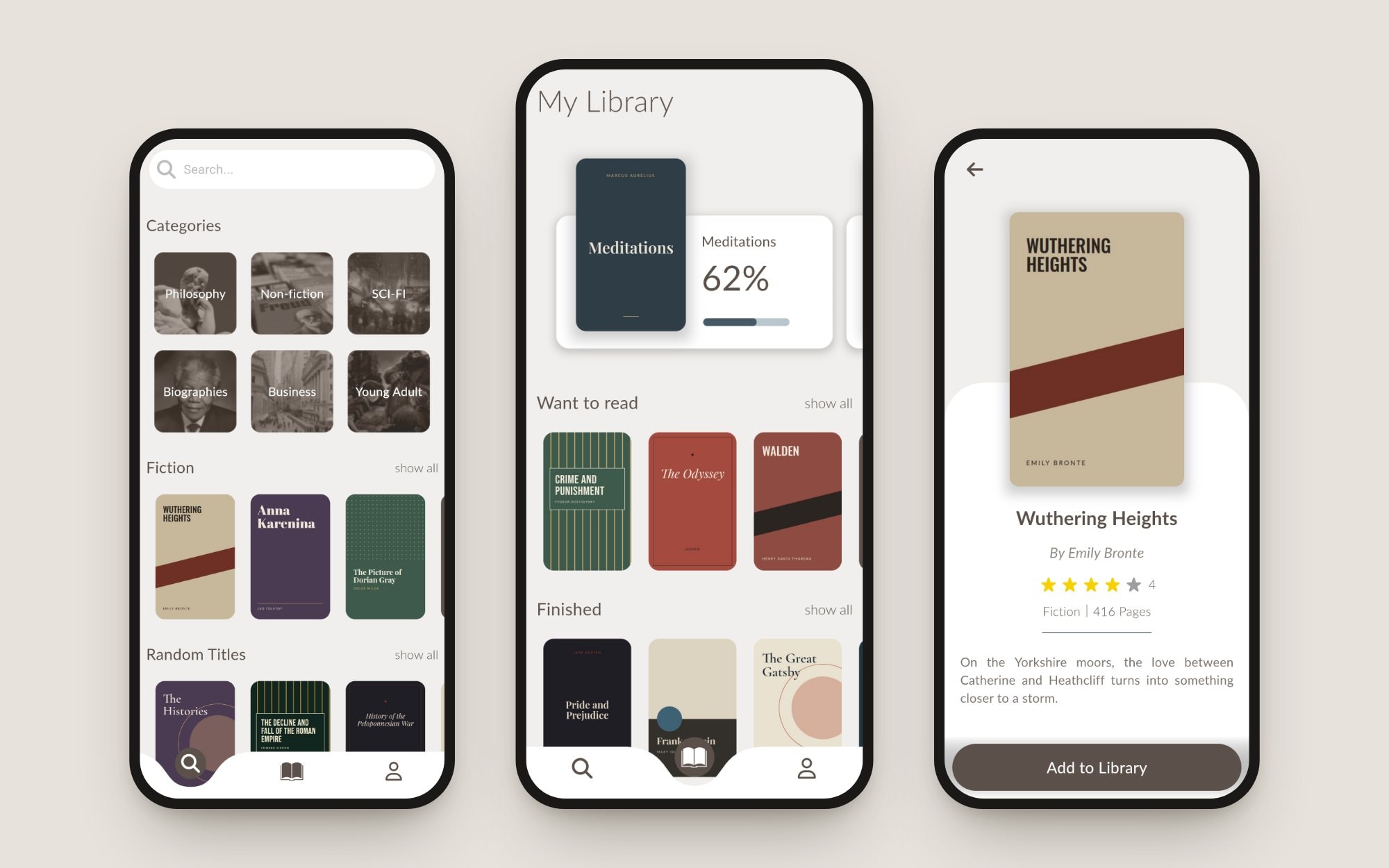
MyLibrary is a reading tracker. You search for a book, put it on one of three shelves (Currently reading, Want to read or Finished), and tell it which page you are on. The app turns that page into progress you can see.
I designed it and built it on my own, and most of the work went into the interface: how it looks, how it moves, and how little it asks of you.
02
Designed in Figma first
Before writing any code, I designed the screens in Figma: the layout of every page, the shelves, the cards and the navigation.
The visual language is quiet and warm, closer to paper and wood than to a typical app. A soft off-white background, a deep brown for type and buttons, a muted blue-grey for progress, and yellow kept only for ratings. One typeface, Lato, carries everything, from the light page titles to the large progress number.
03
Built page by page, component by component
Then I implemented the design in Flutter one page at a time, building each page from small reusable components. The same pieces appear everywhere:
- Book cover: rounded corners and a soft shadow, the same widget on every shelf, in search results and on the book page.
- Continue reading card: the cover breaks out of the top of the card, beside the title, a large percentage and a progress bar.
- Genre tiles: six genres as photographs under a warm brown tint.
- Curved navigation bar: three tabs, with the active one lifted into a bubble that slides across when you switch.
Motion stays gentle. Shelves fade and slide in as they load, results stagger into lists, and shimmer placeholders hold the space while books arrive.
04
Your shelves
The library opens on what you are reading now: a card for each book that you swipe through, with your progress beside it. Tap the card and a small dialog asks which page you are on, and the percentage updates from that.
Below it, Want to read and Finished scroll sideways, and Show all opens the whole shelf as a grid.
05
Finding books
Explore starts with six genres and two rows of books to browse. Search runs on the Google Books API, and every result opens a book page with its cover, author, rating, page count and description. From there, one button puts it on a shelf.
06
Accounts and sync
Accounts run on Firebase Authentication, and the shelves are saved to Cloud Firestore, so your library comes back when you sign in on a new phone. A copy also lives on the device, covers included, so the shelves open instantly and still work offline. Settings covers password resets, signing out, the terms and privacy policy, and deleting the account.
Technical
- Year
- 2023
- Platform
- iOS & Android
- Timeline
- March to August 2023
- Medium
- Apps · Digital products
- Role
- UI/UX designer & Flutter developer
- Status
- Released
- Built with
- Figma
- Dart
- Firebase
- Flutter
- Themes
- Human experience
Also in the archive
Thikra
2026Websites · Digital products
A QR-code photo collection app for weddings and events. Guests scan, upload from their phone, and the couple keeps every photograph in one gallery.
Miskara VR
2023VR · Apps
A virtual reality shopping platform that combines an immersive VR environment with AI to create a different approach to online shopping.